Saturday, February 26, 2011

Comic strip layout


I took these photos of my daughter and my dad at a zoo in Florida. Unfortunately, my poor little daughter has not had much luck with zoo animals. Just a few months ago, she had her hair pulled by a monkey. Here, she is getting bit by a bird! It left a small mark but didn't break any skin. Now, she enjoys telling the story and pointing to the spot where the beak pinched her tiny hand.

The mistake we made was telling her that the bird was on her head. As you can see, she pointed upward inquisitively before putting her hand up there.

I wanted to portray this scene as a sequence of events, and I thought showing it comic-strip style would be cute.

The layout was very easy to do. I drew the outlines of the pictures with the mouse to give it a more hand-drawn feel. The bubbles I grabbed from the internet (I hope I'm not violating any copyright for that).

For the title, I copied the format of the Peanuts comic strip. To get the outline of the text, simply right-click on the layer > Alpha to Selection. Then, Edit > Stroke Selection. Make sure the forground color is black and have it draw a straight line.

I threw my signature in there to make it look even more like a cartoon.

I've always thought that a scrapbook layout should tell a story, and this is just one more way that it can be done.

Monday, February 21, 2011

Digital collages


Here's my first try at making a digital collage by combining photos into one image. It's not technically perfect, but it's a style that I'd like to work on and use in the future.

I took these photos of my daughter on a bright, sunny day last spring. I loved the vibrant color of her pink shirt against the green grass. Since she doesn't pose for pictures (no toddler does), I simply chased her around and snapped as many shots as I could get. I got many of her running away from me, some of her playing with the pebbles, and a few of her staring at the ground.

I've always enjoyed putting several shots of the same scene on a scrapbook page. Photos taken just a few seconds apart can show completely different facial expressions, and it's fun to look at them side-by-side on a page.

With traditional scrapbooking, one must take each print and arrange them on the page. If you're really good, you may be able to crop around the person to make something a little more dynamic.

With the computer, however, you can take collage-making to another level. You can adjust the size and transparency of an image, duplicate an image, flip an image, and use many more simple techniques to make some crazy stuff. In fact, the most time-consuming part of this layout was cropping around each photo.

As with photography, composition is the most important part of making an interesting layout. I used the photo in which she is looking at the camera as the focal point. Following the "rule of thirds," I placed her to the lower left.

To add more visual interest, I threw in a supernova effect on top of the pebble she was holding. This is very easy to do. Go to Filters > Light and Shadow > Supernova. I adjusted the hue to a greenish color to go with the color of the grass.

I decided to lower the opacity of some of the layers to give the layout an ethereal look. Why did I do this? Simply because I currently lack the technical skills to get it to look, well, real. Once I master the skill of blending, I will make layouts that make people think that I have quadruplets.

Combining images like this into a digital collage is one more way to display your photos together. By playing around with the images, you can create some very neat effects.

Friday, February 18, 2011

Making lemonade from lemons


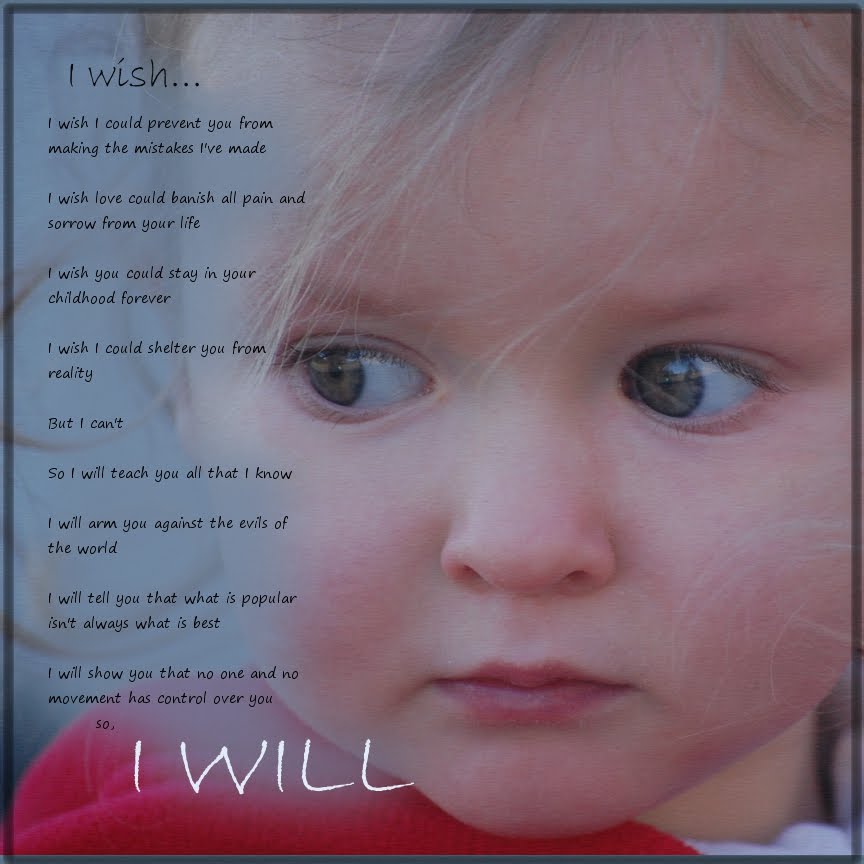
Sometimes, those less-than-perfect shots CAN be perfect for the right layout. A dark shot can create a somber mood, a blurry shot may be good for a background, or a goofy face may go well with humouous journalling.

For anyone who doesn't have kids, let me tell you that two-year-olds don't pose. They don't smile just because you tell them to, either. For this reason, I'm becoming an expert at making due with the shots that I get.

I was trying to get a picture of her to send out for our Christmas cards, which was a very difficult task indeed. The shot was in focus, but she was not looking at the camera, the picture was inproperly framed, and it was underexposed because she ran into a shadow.

Yet I had written a few heartfelt words about her, and wanted a photo to convey the somber mood. This one couldn't have been more perfect. The journalling reads:

I wish

I wish I could prevent you from making the mistakes I've made
I wish love could banish all pain and sorrow from your life
I wish you could stay in you childhood forever
I wish I could shelter you from reality

But I can't

So I will teach you all that I know
I will arm you against the evils of the world
I will tell you that what is popular isn't always what is best
I will show you that no one and no movement has control over you,

So... I will.


Before hitting that "delete" button on your camera, try to think of interesting ways to use those imperfect shots.